22-23 秋冬历年卷

历年考卷整理:22-23 秋冬学期

A.Fill in the blanks in English.

  1. The name of Unix directory “/dev” is from a word device , “/bin” is from a word binary ; while “src” often means source .
  2. Command “if -r $FILE” in bash judges whether a file exists and is readable .
  3. While in vi’s insert mode, pressing ESC key could help return to command mode.
  4. While linking with static X Window library, “-lX11” means the needed library should be a file called libX11.a.
  5. We met “lazy dog” in our homework task of doing typing practices.
  6. A command “kill -9 3721” means the “kill” program sends a #9 signal to a process with PID of 3721.
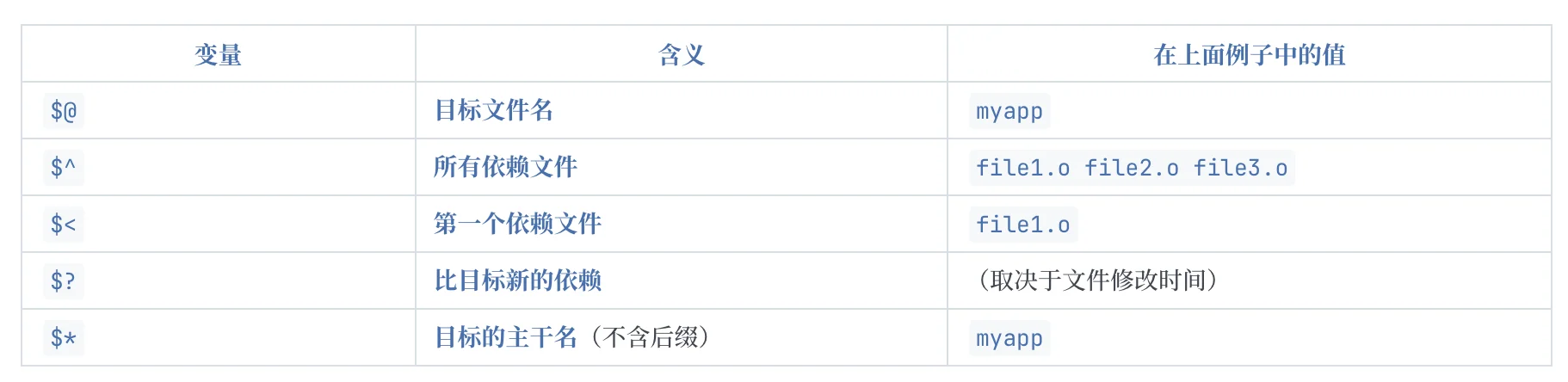
  7. A special macro “$@” inside a makefile rule stands for this rule’s current target .
bash
myapp: file1.o file2.o file3.o
        gcc -o myapp file1.o file2.o file3.o
myapp: file1.o file2.o file3.o
        gcc -o $@ $^
目标(target): 依赖1 依赖2 依赖3
        命令

img

  1. In text-based ftp client program, the letter “l” in a command “lcd” likely means local ; the letter “!” in a command “!pwd” means run a command on the local machine.
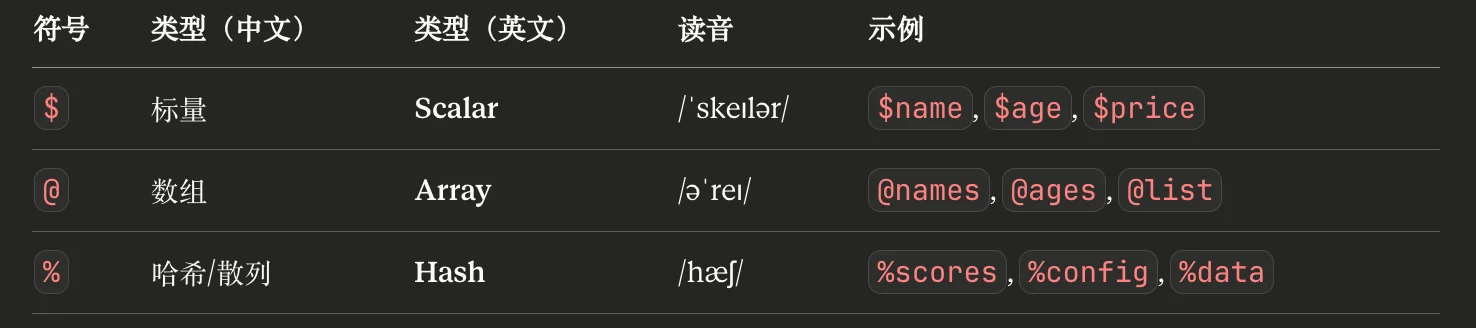
  2. The “@” in a Perl variable name “@ages” indicates this variable is of array type.

img

  1. Vimtutor is a program running tutorial for vim; it has 7 lessons for students learning with.
  2. While “.c” is a common suffix for C source code file, “.o” is usually for object file; and .pl is a common suffix for Perl source code file; .py is a common suffix for Python source code file; .s is a common suffix for assembly source code.

Suffix Naming Convention

  • .sh/.bash/.csh #Shell Script
  • .c/.cpp/ /.h/.hpp #C/C++ Source/Header File
  • .py #Python Script
  • .java #Java Source File
  • .o #Object File,gcc -c之后生成的目标文件
  • .s #Assembly Source File,汇编文件
  • .a #Library (static),静态库
  • .so #Dynamic-linking Library (shared object),动态库
  • .f #Fortran Source File
  • .pl #Perl Script perl 脚本
  • .tcl #TCL/TK Script
  1. Each letter in EDA stands for Electronic Design Automation ; each letter in CAD stands for Computer Aided Design.

B.Choose single answer from candidate choices.

  1. yy4p in vi command mode means to duplicate 4 lines (duplicate 复制) 4dd: delete 4 lines

4j: move cursor down 4 lines

4k: move cursor up 4 lines

  1. The interpreter program of Tcl/TK scripts: wish

tclsh:Tcl 脚本的标准解释器(只带 Tcl,不带图形界面 Tk)。

wish:Tk 脚本/带 GUI 的 Tcl 脚本解释器(wish = Tcl + Tk)。

  1. Interpreter program of Perl scripts: perl

注意P不大写

Interpreter program of Python scripts: python

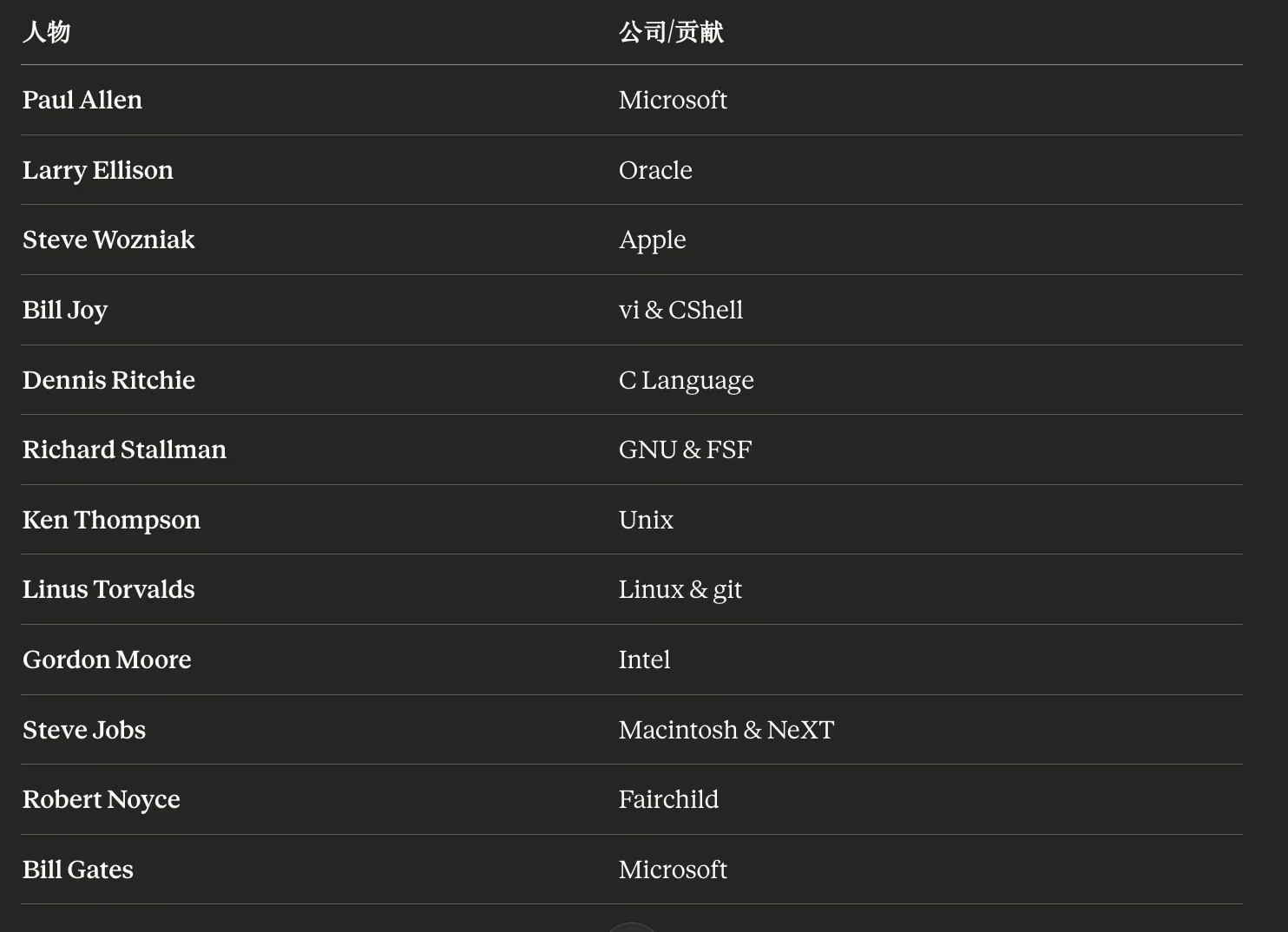
  1. A company was famous for its copying machine products XeroxIntel: microprocessors (CPUs) and other semiconductor chips.

Texas Instruments (TI): semiconductors (especially analog and embedded chips); also calculators.

IBM: enterprise computing products and services (servers/mainframes, software, IT consulting).

  1. Key stroke for moving cursor position down a full page in vi: ^f (Ctrl-f) ^u (Ctrl-u): up(back) a half page

^d (Ctrl-d): down a half page

^b (Ctrl-b): back a full page

  1. It is the world’s largest ICCAD company in year 2022: Synopsys Cadence is second

Mentor Graphics is third

  1. Command can give a Unix command an additional name: alias remove: remove files or directories

move: move (rename) files

rename: change the name or location of a file

  1. Command option to tell gcc about position information of header (.h) file: -L -h: --help

-H: Print the name of each header file used, in addition to other normal activities. (编译的同时,打印所有包含的头文件)

-l: -l<name> tells the linker to link against a library named lib<name>.so (shared) or lib<name>.a (static).

  1. :s/Oct\./Nov./ in vi command line mode performs: substitution
  2. A Class-B IP address: 135.0.1.1

注意最开始的数字大小

  • Class A:以 0 开头 1–126
  • Class B:以 10 开头 128–191
  • Class C:以 110 开头 192–223
  • Class D:以 1110 开头 224–239
  • Class E:以 1111 开头 240–255
  1. A shell command has different effects than the other 3 commands: cd $PWDcd,cd ~,cd $HOME: change directory to home directory

cd $PWD: keep current directory

  1. The “-Rt” in a command “ls -Rt” means: recursively, time orderly
  2. A disk partition has its free-space information in: super blockinode stores metadata for an individual file.

data block stores actual file contents.

  1. Command that can NOT display contents of a plain text document:lscat displays the whole file.

head displays the first part of the file.

tail displays the last part of the file.

  1. Super User of Unix system is also known as: root
  2. GNU GPL is a technical term most-likely related to: software lisence graphics: 图形/图像

debugger: 调试器,如gdb

source code complier:代码编译器,如gcc

  1. While using more to browse a document, pressing this key could exit the browsing: q

b: back to the full page

  1. Code version control tool git is developed under: Linus Torvalds Bill Joy: vi & CShell

Steve Wozniak: Apple

Bill Gates: Microsoft

reviewtxt里面的

img

  1. Unix system time can be changed by command program: datedate can display the date/time and (with proper privileges) set the system time.

sleep pauses execution.

xclock shows a clock (GUI), doesn’t set system time.

time measures how long a command takes, doesn’t set system time.

  1. Key stroke for moving cursor position up in vi: k
  2. It is a network protocol, but NOT on Application Layer: TCP

Xwindow不是协议 记一下, X11才是

  1. To repeat last command in shell, type: !!

在vim中是.

  1. Key stroke pair can pause-resume output display of a shell program (where ^ stands for Ctrl key): ^S -^Q
  2. Who always listens to a network port and waits to provide network service: daemon
  3. Honored as inventor of C language: Dennis Ritchie Ken Thompson 写了B语言 是间接贡献者
  4. This Unix program can locate a command’s position in the file tree:which
  5. A C function ‘strcasecmp()’ is different from another function ‘strcmp’ in handing: character case
  6. When Linux was first mentioned, Linus Torvald was a student in:Finland
  7. Output file finally generated by command ‘gcc tri.c -lm’:a.out
  8. To find a certain word inside a file, we can use program: grep

C.Accurately describe the main function and command line syntax of each Unix command in English.(18 pt)

Accurately describe each Unix command and its usage in English

Accurately describe the main function and command line syntax of each Unix

command in English.(18 pt)一个两分

cut

Main function:

Extract selected bytes, characters or fields from each line of a file.

Syntax:

cut option files

  • -d use delimiter instead of TAB for field delimiter
  • -f selected only these fields
  • -c select only these characters
  • -b select only these bytes

mkdir

Main function:

Make directory (create one or more directories, if they do not already exist)

Syntax:

mkdir option directory

  • -p make parent directories as needed
  • -v print a message for each created directory

umont

Main Function:

Remove a file system from the directory tree

Syntax:

umont {directory | device}

  • -v print more information
  • -f force an umount

xterm

Main Function:

Start an X window system terminal emulator

Syntax:

xterm option

  • -geometry set window size
  • -T title set window title

cp

Main Function:

Copy files or directories

Syntax:

cp option source_file target_file

  • -i interative
  • -f force
  • -p preserve
  • -R recursively

top

Main Function:

Display real-time view of system processes

Syntax:

top option

  • -u USER show only this user's processes
  • -p PID monitor specific PID(s)

du

Main Function:

Estimate the disk usage of a file or directory

Syntax:

du option file or directory

  • -s summary
  • -h human-readable

paste

Main Function:

Merge lines of files in parallel, separating columns with a delimiter

Syntax:

paste option file

  • -d specific delimiter

ping

Main Function:

Test network reachability and measure round-trip time

Syntax:

ping option destination


D.Explain the meanings of ALL fields (ALL words and symbols) of the command line in reasonable details; then explain the purpose of the whole command line. (12 pts, in Chinese OK)

Explain the meanings of ALL fields (ALL words and symbols) of the command line

in reasonable details; then explain the purpose of the whole command line.

(12 pts, in Chinese OK)

65. find $INC -name std*.h | tee hlist (English)

  • find = a command to recursively search for files/directories.
  • $INC = environment variable expansion; the shell replaces $INC with its value. If $INC contains multiple paths separated by spaces, the shell splits them and find searches each.
  • -name = an option telling find to match entries by filename.
  • std*.h = a pattern used by find -name: std followed by * then .h. Here * means “any sequence of characters (possibly empty)”, so it matches stdio.h, stdlib.h, stdarg.h, etc. . is just a literal dot in the filename.
  • | = a pipe: sends the output (stdout) of the left command into the input (stdin) of the right command.
  • tee = reads from stdin and writes to both stdout and a file.
  • hlist = the output filename that tee writes to. Purpose of the whole line: search under the directory/directories stored in $INC for header files whose names start with std and end with .h, show the results on the screen, and also save the list into hlist.

65. find $INC -name std*.h | tee hlist(中文)

  • find:递归地在目录树中查找文件/目录的命令。
  • $INC环境变量展开;shell 会把 $INC 替换成它的值(通常是头文件目录,如 /usr/include./include)。如果 $INC 里有多个用空格分隔的路径,shell 会分词,find 会在每个路径下搜索。
  • -namefind 的匹配条件,按文件名匹配。
  • std*.hfind -name 使用的通配模式:以 std 开头,* 表示“任意长度任意字符序列”,最后以 .h 结尾,所以能匹配 stdio.hstdlib.hstdarg.h 等。. 就是文件名里的点。(注意:不加引号时,shell 可能先把 std*.h 在当前目录展开;更稳妥写法是 -name 'std*.h'。)
  • |管道,把左边命令的输出送到右边命令的输入。
  • tee:从标准输入读数据,同时写到屏幕(stdout)和文件。
  • hlisttee 要写入的文件名。 整行目的:在 $INC 指定的目录下查找名字形如 std*.h 的头文件,把结果既显示出来又保存到 hlist 文件中。

66. make -f makefile.bit clean; touch demo_bit.c; make -nf makefile.bit (English)

  • make = build automation tool; it reads rules from a makefile and runs commands to build targets.
  • -f makefile.bit = option -f tells make to use this specific makefile (makefile.bit) instead of the default Makefile/makefile.
  • clean = a target name; typically removes generated files (object files, executables) so you can rebuild from scratch.
  • ; = command separator in the shell: run the next command after the previous one finishes.
  • touch demo_bit.c = touch updates the file’s modification timestamp to “now”; if the file doesn’t exist, it creates an empty file.
  • make -nf makefile.bit = options combined: -n (“dry-run”) + -f makefile.bit.
    • -n = print the commands that would run, but do not execute them.
    • With no explicit target at the end, make uses the default target (the first target in the makefile). Purpose of the whole line: (1) clean the project using makefile.bit, (2) mark demo_bit.c as newly modified (or create it), and then (3) preview what commands make would execute (without actually running them) to rebuild the default target according to makefile.bit.

66. make -f makefile.bit clean; touch demo_bit.c; make -nf makefile.bit(中文)

  • make:构建工具,根据 makefile 的规则执行编译/链接等命令。
  • -f makefile.bit-f 指定使用某个 makefile,这里明确用 makefile.bit,而不是默认的 Makefile/makefile
  • clean:一个目标(target),通常用于删除编译产生的中间文件/可执行文件,方便重新完整构建。
  • ;:shell 的命令分隔符,表示按顺序执行下一条命令(不像 && 那样要求前一条成功)。
  • touch demo_bit.c:更新 demo_bit.c 的修改时间为当前时间;若文件不存在则创建空文件。常用于“骗过”make:让它认为源文件更新了,从而触发重编译。
  • make -nf makefile.bit:把两个选项合在一起:-n + -f makefile.bit
    • -n只打印将要执行的命令,不真正执行(dry-run)。
    • 末尾没写 target,则使用 makefile 中的默认目标(通常是第一个目标)。 整行目的:先用 makefile.bit 执行 clean 清理,再用 touchdemo_bit.c 标记为“刚更新”,最后用 dry-run 方式预览如果要按 makefile.bit 构建默认目标,make 会运行哪些命令。

67.export PATH=pwd/fake_bin:PATH;echoPATH; echo PATH; (English)

  • export = mark a shell variable as an environment variable, so child processes (programs you run afterward) inherit it.
  • PATH=... = assignment to the PATH environment variable (the search path for executable commands).
  • pwd = command substitution using backticks: run pwd (print working directory) and substitute its output (e.g., /home/user/project). (Modern style is $(pwd).)
  • /fake_bin = a directory named fake_bin under the current directory.
  • : = PATH separator on Unix-like systems; PATH is a colon-separated list of directories.
  • $PATH (on the right-hand side) = expands to the previous/current PATH value, so you append the old PATH after your new directory.
  • ; = command separator.
  • echo $PATH = print the resulting PATH to the terminal. The final ; is optional; it just ends the command. Purpose of the whole line: prepend the directory <current working directory>/fake_bin to the front of PATH (so executables in fake_bin are found before system ones), then display the new PATH value.

67. export PATH=pwd/fake_bin:PATH;echoPATH; echo PATH;(中文)

  • export:把变量导出为环境变量,后续启动的子进程也能继承。
  • PATH=...:给 PATH 赋值;PATH 决定 shell 在哪些目录里按顺序查找可执行命令。
  • pwd:反引号形式的命令替换;执行 pwd(输出当前工作目录),再把输出文本插入到这里。(更推荐写法是 $(pwd)。)
  • /fake_bin:当前目录下的 fake_bin 子目录。
  • ::PATH 的分隔符(多个目录用冒号串起来)。
  • 右侧的 $PATH:展开成原来的 PATH,把旧 PATH 接在新目录后面,避免把原 PATH 覆盖丢失。
  • ;:命令分隔符。
  • echo $PATH:把新的 PATH 打印出来;最后的 ; 可有可无。 整行目的:把“当前目录/fake_bin”放到 PATH 最前面(让这里的命令优先被找到),然后输出修改后的 PATH。

68. tar xvf core.tar . ; chmode 764 * (English)

  • tar = tool for working with tar archives.
  • xvf = three tar flags (often written together):
    • x = extract files from an archive
    • v = verbose; list files as they are extracted
    • f = archive file follows (next token is the archive filename)
  • core.tar = the tar archive file to extract from.
  • . = a literal argument passed to tar. In many contexts . means “current directory”, but for tar it can also mean “extract only the archive member named . (or ./... depending on archive entries)”. If the archive contains paths like ./something, the dot-related prefix can matter. (If the archive does not contain such an entry, this argument may cause “not found in archive” behavior.)
  • ; = command separator.
  • chmode = as written, this is likely a typo. The standard command is chmod. If you really run chmode, the shell will usually say “command not found”. Assuming it meant chmod:
  • chmod = change file permission bits.
  • 764 = an octal permission mode:
    • 7 (owner/user) = rwx (read, write, execute)
    • 6 (group) = rw- (read, write)
    • 4 (others) = r-- (read only)
  • * = shell wildcard (“glob”) expanding to all non-hidden names in the current directory. The shell expands it before chmod runs. (If nothing matches, some shells leave * as-is and chmod errors.) Purpose of the whole line: extract files from core.tar (with verbose listing) into the current area (subject to the . argument and archive paths), then set permissions of (almost) everything in the current directory to 764if the command is corrected to chmod.

68. tar xvf core.tar . ; chmode 764 *(中文)

  • tar:处理 tar 归档文件的工具。
  • xvf:三个选项合写:
    • x:从归档中解包/解压(extract)
    • v:verbose,解包时把文件名打印出来
    • f:后面紧跟归档文件名
  • core.tar:要解包的 tar 文件。
  • .:传给 tar 的参数。很多时候 . 表示“当前目录”,但对 tar 来说也可能表示“只解出归档里名为 . 或带 ./ 前缀的条目”。如果归档里没有对应条目,可能会报“归档中找不到该成员”。
  • ;:命令分隔符。
  • chmode:按字面这是很可能的拼写错误;标准命令应为 chmod。真的执行 chmode 通常会提示找不到该命令。以下按 chmod 来解释:
  • chmod:修改文件权限。
  • 764:八进制权限:
    • 7(属主)=rwx(读写执行)
    • 6(同组)=rw-(读写)
    • 4(其他人)=r--(只读)
  • *:shell 通配符,先由 shell 展开成当前目录下所有非隐藏文件/目录名再交给 chmod。(若没有匹配项,有的 shell 会把 * 原样传入导致报错。) 整行目的:从 core.tar 解包文件(并显示解包清单),然后把当前目录下匹配 * 的条目权限改成 764(前提是把 chmode 更正为 chmod)。

E.Answer questions in reasonable details. (15 pts, in Chinese OK if not required in English)

How to pronounce the project name GNU in English? Why technically do we prefer to call our Linux system a GNU/Linux system?

  1. GNU’s Not UNIX
  2. GNU/Linux means that the upper program of the operating system is GNU and the kernel is Linux. Only when combined can a complete operating system be formed. It can be said the Linux is a component of the GNU project. The reason why we call it with different names is that they have different ideas. GNU advocates for free software while Linux advocates for open source software.Combining GNU tools + Linux kernel together creates what we commonly refer to as the "Linux system." Out of respect for GNU's contributions, some people insist on calling it GNU/Linux.

Write a shell program ‘evenarg5.bash’ that prints out 5 times the command line arguments on even number positions (e.g., arg2, arg4, arg6, …). The program should be able to take an unlimited number of arguments. Please describe the program flow first and give enough comments along the code. Magic Symbol is needed too.

Magic Simbol就是最开头的#! /bin/bash 指定使用的shell

这个思路其实就比较简单了,注意语法问题就行。双层for循环,外面那层负责做5次循环打印,里面那层负责偶数输出,就是C程逻辑了。

细节注意一下:for这个round in 1 2 3 4 5后面要加上; $@会比$*好一些,用$@来指定传入参数,注意带上double quotation mark, 可以防止格式错误。if当中里面记得要有空格,如果要进行算数运算,必须套上$(())在里面做-eq之类的只能用于数字比较,然后echo "$arg"就可以输出具体指定的参数了,注意细节就行。

bash
#!/bin/bash

# 外层循环:打印 5 次
for round in 1 2 3 4 5; do

    # pos 用来记录当前是第几个参数位置(arg1 从 1 开始)
    pos=1

    # 遍历所有参数:"$@" 会保持每个参数原样(比 $* 更安全)
    for arg in "$@"; do
        # 判断是否为偶数位置:pos % 2 == 0
        # 注意: [ ] 两边必须要有空格
        if [ $((pos % 2)) -eq 0 ]; then
            echo "$arg"
        fi

        # 位置自增
        pos=$((pos + 1))
    done
done

If you have a Linux computer and a Microsoft Windows computer, an ICCAD software is running on the Linux computer and you want to see its GUI on the Windows computer, what details you should prepare to do?

就是ssh小任务的步骤,记几个关键词

Key method: SSH + X11 Forwarding + Windows X Server

Windows prep: Install & start an X Server

Connect from Windows: Use SSH with X11 forwarding (ssh -X)

Linux prep: Ensure sshd allows X11 forwarding (X11Forwarding yes) + ICCAD env/license OK

Network requirement: Windows must reach Linux SSH port (22 or custom) through firewall/VPN/jump host (same LAN not required)

Run location: Start ICCAD on Linux (iccad &)

Display location: GUI appears on Windows via the X Server

Quick test: Run xclock / xeyes to verify forwarding

Explain the function of this Perl command line “ $str =~ /((\w._-+)@(\w._-+))/ “ in detail.

这题实际上还是在考正则表达式

$str =~ /.../ 表示用regex(正则)去匹配 $str

((... )@( ... )) 有 3 个捕获组:

bash
(
  ( [\w._-]+ )   # 组2:@ 前面
  @              # 必须匹配 @
  ( [\w._-]+ )   # 组3:@ 后面
)                # 组1:整个 email 形状

[\w._-]+ 表示由允许字符组成的至少 1 个字符的连续串

[\w._-] 允许的字符有:(就是正则表达式的匹配,perl支持正则)

  • \w:字母/数字/下划线(等价于 [A-Za-z0-9_],在 Unicode 语境下可能更广)
  • .:点
  • _:下划线(其实已经在 \w 里了,但这里写了也不坏)
  • -:横杠(连字符)

+号表示[\w._-] 重复一次或者多次

(如果有空格)说明空格是必须匹配的字面空格

所以最后的匹配结果就是一个形如shen_xue.w-en666@zju.edu.cn的email

附加题:

试谈一谈如何从各个角度理解集成电路设计工程师需要”expertise in Perl, Tcl, UNIX shell, Makefiles, C, C++ and etc.”?

感觉就是解释后面那些东西是什么+胡扯

C/C++等属于高级编程语言,广泛用于开发EDA工具,这些工具用于IC设计。

Perl/Tcl:这些脚本语言在自动化任务和快速原型设计中很有用。它们通常用于处理文本文件(如设计规范、配置文件和数据报告),自动化设计流程,以及创建EDA工具的用户界面(无需编译)

UNIX Shell:大多数EDA工具在UNIX或类UNIX系统上运行。熟练使用Shell命令和脚本能够帮助工程师有效地管理文件系统、执行和监控工具,以及处理数据。(日志文件)

Makefiles:这是一种自动化构建工具,可以用来编译和链接程序,管理项目中的复杂依赖关系。在大型IC设计项目中,使用Makefiles可以提高重复构建过程的效率。

F.How to pronounce the following meta-characters in spoken technical English?

/ \ * @ ( { 复习一遍:

括号&线条

  • {}curly bracket(curly - 卷曲的)
  • []square bracket(square - 直角的)
  • ()parenthesis (记忆:parent-hesis )
  • <less-than sign
  • >greater-than sign
  • |vertical bar(vertical - 竖直的)
  • /slash(注意是右上往左下)
  • \backslash

标点

  • ,comma
  • .dot / period
  • :colon
  • ;semicolon(和semiconductor一个道理,半个冒号)
  • ' apostrophe(/əˈpɒstrəfi/)
  • "double quotation mark
  • ?question mark

数学符号

  • +plus sign
  • -hyphen-minus(连接单词时叫hyphen(连字符),算数为minus)
  • =equal sign
  • *asterisk(aster希腊语小星星)
  • %percent sign
  • ^caret
  • &ampersand(词源:and per se and 念快一点就是ampersand)

特殊符号

  • ~tilde
  • ````` : backquote
  • !exclamation mark (exclamation - 惊叹)
  • @at sign
  • #number sign (也叫hash)
  • $dollar sign
  • _under score
System Development Tools
20-21 历年卷

评论区