Review on C Basics
- 基本编程特性(Basic programming features)
- 变量/运算符/表达式(variables, operators, expressions)
- 流程控制(flow control:loop, branch, …)
- 函数(functions)
- C 的范围(What C does NOT provide)
- C 不直接提供高级特性(advanced features),例如 OS services、I/O
- 这些能力通常由库(libraries)实现
Learning More of C Programming
- 建议练习(Try do the following)
- 理解 编译器和链接器做什么(what compiler and linker do)
- 调试程序,并查看汇编代码(debug + assembly code)
- 了解一些你的 CPU(know something of your CPU)
- 关键概念(Some key concepts)
- 数据表示(Data representation)
- 变量存储(Variable storage)
- 字符串处理(Character string manipulation)
- 指针(Pointer)
- 内存管理(Memory management)
- 函数调用过程(Function calling procedure)
- 学习收益(Why helpful)
- 有助于理解更高级语言(如 C++、Python 等)的特性设计(feature designs in higher level languages)
数据表示 | Data Representation
- 基本类型及大小/范围 | Basic types: size/range
- void:0 bytes,无值(0 bytes, no value)
- char:1 byte,-128~127(或 0~255)
- short:2 bytes,-32767~32767
- int:2 / 4 / 8 bytes(对应 16/32/64-bit machines)
- long:4 bytes,约 ±2,147,483,648
- float:4 bytes,约 ±3.4 × 10^±38
- double:8 bytes,约 ±1.79 × 10^±308
- 指针与字符串 | Pointers & strings
- char*:指向连续的字符字节,以
\0结尾(C 字符串) - void* / int* / …:指针长度取决于机器硬件(pointer length depends on machine hardware)
- char*:指向连续的字符字节,以
- 复合类型 | Composite types
- structure / union / class:包含数据成员的内存块(memory block containing data members)
- 查看大小 | Size query
- sizeof():获取类型/对象所占字节数(find the size)
C 变量类型 | C Variable Types
- 局部变量 | Local variables
- 在函数体内部声明(declared within the body of a function)
- 只能在该函数内使用(only be used within that function)
- 全局变量 | Global variables
- 在所有函数之外声明(located outside any of the program’s functions)
- 所有函数都可访问(available to all functions)
- 静态变量 | Static variables
- 在函数内声明:在该函数内使用(declared in a function, used in this function)
- 在函数外声明:在该文件内使用(declared outside functions, used in this file)
- 存储位置与生命周期 | Storage & lifetime
- 局部变量:存放在 栈(stack)
- 临时的(temporal)
- 初始值可能是随机的(initial values in random)
- 全局/静态变量:存放在 数据段(data segment)
- 生命周期与程序一样长(life as long as the program)
- 初始值通常为 0(initial value usually be 0),但仍需小心(should be careful)
- 局部变量:存放在 栈(stack)
字符串操作 | Character String Manipulation
- 字符串函数 | String functions
- strcpy / strncpy:字符串拷贝(copy)
- strcat / strncat:字符串拼接(concatenate)
- strcmp / strncmp / strcasecmp / strncasecmp:字符串比较(compare,后两者忽略大小写)
- strtok:字符串分割/分词(tokenize)
- strlen:字符串长度(length)
- 字符串指针 | String pointer
char *str;- str 是指针,指向内存中字符字节块的起始字节(pointer to the beginning byte of the character byte block in memory)
没 n:拷完整字符串(含 \0),但可能越界写
有 n:限制最多拷 n 字节,但可能不带 \0,需要你自己确保终止符
什么什么ELF格式?
字符串内存示意 | Character String Manipulation (memory example)
- 数组字符串与结尾符 | Char array string &
\0char str[8] = "HELLO";:内存里依次是H E L L O \0,后面还有空余字节char str1[8] = "WORLD!";:内存里依次是W O R L D ! \0
- 指针与偏移 | Pointer & offset
char *str2 = str + 2;str指向str[0](即'H'的地址)str2指向str[2](即"HELLO"里的第一个'L')
printf("%s, %d, %d\n", str2, strlen(str), strlen(str2));%s从str2开始一直打印到遇到\0:输出 "LLO"strlen(str):5strlen(str2):3
- 几种常见操作可能造成的结果 | Effects of operations
strcpy(str, str1);- 把
"WORLD!"(含\0)拷进str,会覆盖原来的 "HELLO"
- 把
strcat(str2, str1);- 从
str2指向的位置开始把str1拼接上去 - 风险:
str2指向的是str的中间位置,剩余空间很小,容易越界/覆盖后续内存
- 从
strncpy(str, str1, strlen(str1));- 这里
strlen(str1)=6,只拷 6 个字节(WORLD!),不会自动补\0 - 结果:
str可能变成非\0结尾的“字符串”,后续printf("%s")/strlen可能越界读
- 这里
指针与字节序 | Pointer & Endianness
- 指针的定义 | What is a pointer
- 指针是一个变量,保存某个变量/函数的地址(a variable containing the address of a variable/function)
- 形式示例(课件给的写法):
type *ptr,函数指针type *(ptr)();
- 地址在内存里的表示 | How an address is stored
- 例子地址:
0xa8906654(按字节可看作:a8 90 66 54) - 大端(Big Endian / Motorola order):高位字节在低地址
- 内存顺序:
a8 90 66 54
- 内存顺序:
- 小端(Little Endian / Intel order):低位字节在低地址
- 内存顺序:
54 66 90 a8
- 内存顺序:
- 例子地址:
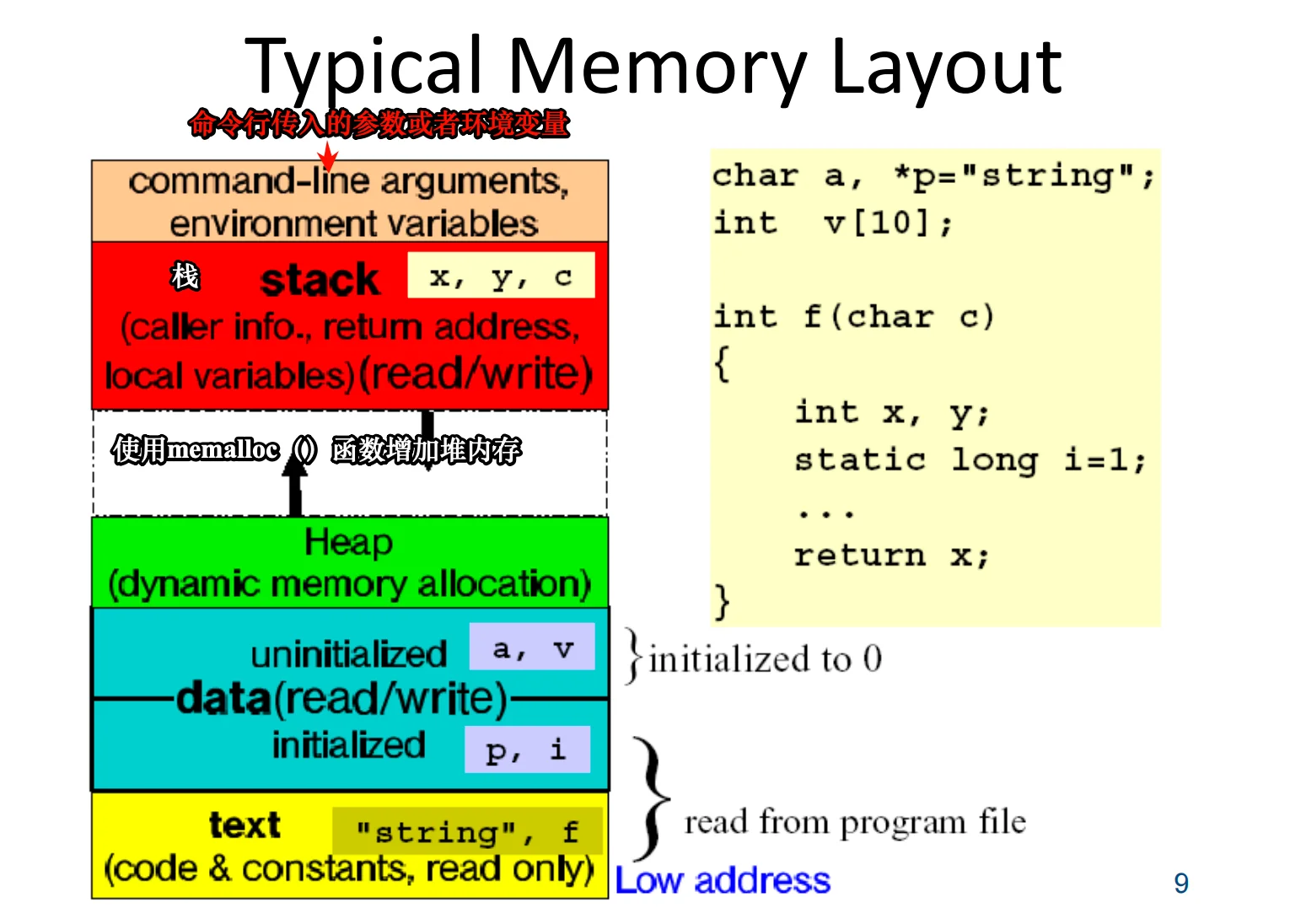
典型内存布局 | Typical Memory Layout
智云课堂再看一遍?
- 从低地址到高地址的大致分区 | Segments (low → high)
- text 段(code & constants, read only)
- 存放:代码、常量(例如字符串常量
"string"、函数f)
- 存放:代码、常量(例如字符串常量
- data 段(read/write)
- initialized:已初始化的全局/静态变量(图中例:
p,i) - uninitialized(BSS):未初始化的全局/静态变量(图中例:
a,v),通常初始化为 0
- initialized:已初始化的全局/静态变量(图中例:
- heap 堆(dynamic memory allocation)
- 动态分配内存区域
- stack 栈(caller info, return address, local variables)
- 调用信息、返回地址、局部变量(图中例:
x, y, c)
- 调用信息、返回地址、局部变量(图中例:
- 顶部还有:命令行参数、环境变量(command-line arguments, environment variables)
- text 段(code & constants, read only)
- 增长方向 | Growth direction
- 堆(heap)向高地址增长
- 栈(stack)向低地址增长
动态数组 | Dynamic Array
- 一维动态数组(未初始化)| One-dimensional dynamic array (un-initialized)
int *vector;vector = (int*) malloc(sizeof(int) * NUM);- 分配 NUM 个 int 的空间
- 内容不初始化(un-initialized)
- 失败处理:
fprintf(stderr, "Not enough memory\n");exit(1);
- 一维动态数组(初始化为 0)| Array initialized to 0
int *vector;vector = (int*) calloc(num, sizeof(int));- 分配 num 个 int
- 内存初始化为 0(initialized to 0)
- 失败处理同上(Not enough memory / exit(1))
- 二维动态数组(连续内存)| Two-Dimensional dynamic array (contiguous block)
int *matrix;matrix = (int*) calloc(ROWS * COLS, sizeof(int));- 实际分配的是 一整块连续的一维内存,总元素数
ROWS*COLS - 初始值为 0(each set to 0)
- 实际分配的是 一整块连续的一维内存,总元素数
- 访问
(i, j)元素:matrix[i * COLS + j] = 24;(access element (i,j))
- 二维动态数组(指针数组)| Pointer array (slower but convenient)
- 说明:Pointer array, slower but convenient
int **matrix, i;- 先分配“行指针数组”:
matrix = (int**) calloc(ROWS, sizeof(int*));
- 再逐行分配每一行:
for (i = 0; i < ROWS; i++)matrix[i] = (int*) calloc(COLS, sizeof(int));
- 每次分配都要检查 NULL,并在失败时:
fprintf(stderr, "Not enough memory\n"); exit(1);
函数参数传递 | Passing Function Arguments
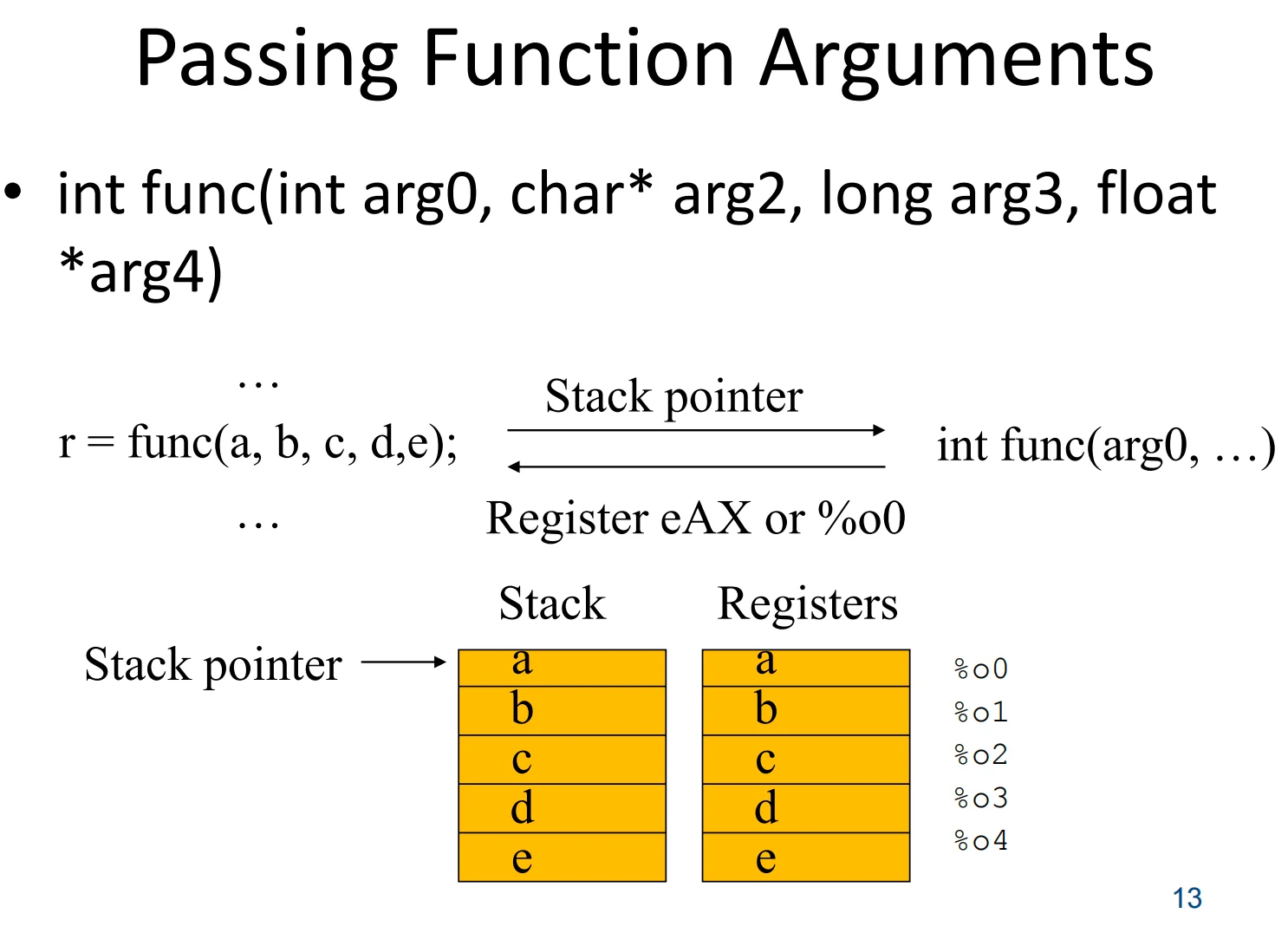
- 函数调用形式 | Call form
- 函数定义示例:
int func(int arg0, char* arg2, long arg3, float *arg4) - 调用示例:
r = func(a, b, c, d, e); - 重点:调用时传入的实参
a,b,c,d,e会对应到形参arg0,...
- 函数定义示例:
- 两种主要传参位置 | Where arguments go
- 栈(Stack)传参
- 参数被压入栈中(图左:
a b c d e依次放在栈里) - 通过 栈指针(stack pointer) 定位这些参数
- 参数被压入栈中(图左:
- 寄存器(Registers)传参
- 参数直接放进寄存器(图右:
a b c d e放在%o0 ~ %o4) - 寄存器传参通常更快(少访存)
- 参数直接放进寄存器(图右:
- 栈(Stack)传参
- 返回值位置 | Return value
- 返回值放在特定寄存器里:
- 例:
eAX(x86)或%o0(图里写的寄存器)
- 例:
- 调用结束后,调用方从该寄存器取回结果赋给
r
- 返回值放在特定寄存器里:
- 图的核心想表达的点 | Key takeaway
- 同一个函数调用,参数既可能走 stack,也可能走 registers
- 具体用哪种、以及先用多少个寄存器,取决于平台/ABI/编译器约定
标准与底层 I/O | Standard and Low-Level I/O
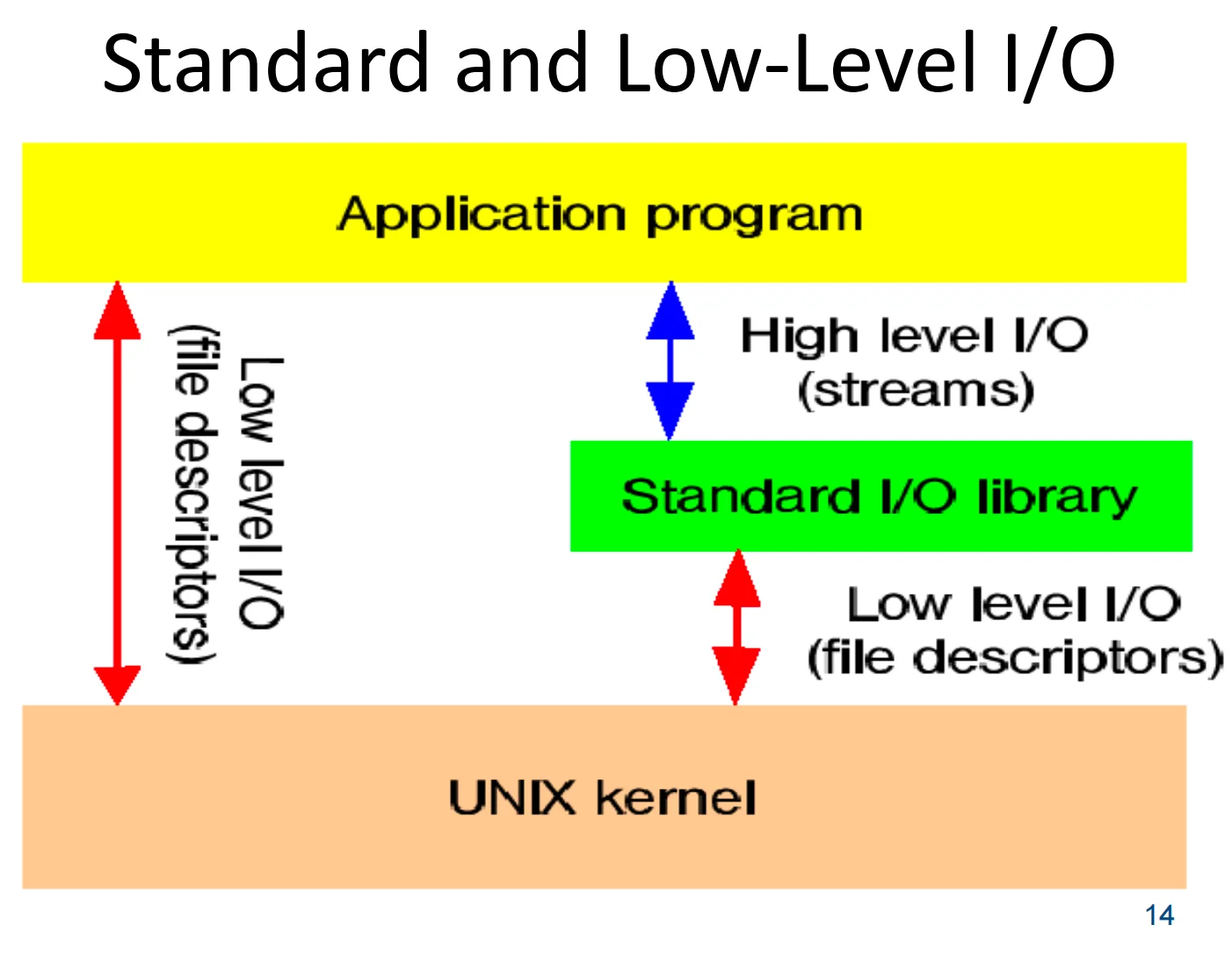
- 整体分层 | Overall layers
- 应用程序 | Application program
- 标准 I/O 库(高层 I/O,流)| Standard I/O library (high level I/O, streams)
- UNIX 内核 | UNIX kernel
- 高层 I/O(流)| High level I/O (streams)
- 应用通过 Standard I/O library 做 I/O(比如“流”的概念:文本/缓冲/格式化等)
- 特点:更方便、更抽象,通常带 缓冲、格式化(例如 printf 这类)
- 底层 I/O(文件描述符)| Low level I/O (file descriptors)
- 标准 I/O 库的底层最终会调用 UNIX kernel 提供的系统调用接口
- 使用 file descriptors(文件描述符) 来标识打开的文件/设备/管道等
- 特点:更接近 OS,粒度更底层,控制更直接(但用起来更“硬核”)
- 两条路径 | Two paths shown in the figure
- 常见路径:应用 → 标准 I/O 库 → 内核
- 图中蓝色箭头:应用与标准库交互(streams)
- 红色箭头:标准库再向下调用内核(file descriptors)
- 直接路径:应用 → 内核(系统调用)
- 图左侧长红箭头:应用也可以跳过标准库,直接做 low level I/O(file descriptors / syscalls)
- 常见路径:应用 → 标准 I/O 库 → 内核
流 I/O 与底层 I/O | Stream I/O vs. Low-Level I/O
- 整体关系(从应用到内核)| Overall relationship
- 应用程序(Application program)
- 可以用两条路做 I/O:
- 高层 I/O:流(streams)
- 底层 I/O:系统调用(syscalls)
- 可以用两条路做 I/O:
- 标准 I/O 库(Standard I/O library,
stdio)- 提供 Stream I/O(流 I/O):带缓冲、带格式化(
printf/scanf风格) - 底层会调用内核的 Low-level I/O(open/read/write 等)
- 提供 Stream I/O(流 I/O):带缓冲、带格式化(
- UNIX 内核(UNIX kernel)
- 提供 Low-level I/O(file descriptors):最原始、最贴近 OS 的接口
- 应用程序(Application program)
- Stream I/O(流 I/O)特点| Stream I/O features
- 句柄类型:
FILE *(比如stdin/stdout) - 常见优点:
- 缓冲(buffering):减少系统调用次数
- 格式化 I/O:
fprintf/fscanf更方便
- 典型函数(slide 上这些):
FILE *fopen(char *pathname, char *type)int fflush(FILE *fp)int fprintf(FILE *fp, char *format, ...)int fscanf(FILE *fp, char *format, ...)int fgetc(FILE *fp)int fputc(int c, FILE *fp)int fputs(char *s, FILE *fp)char *fgets(char *s, int n, FILE *fp)size_t fread(void *ptr, size_t size, size_t nobj, FILE *fp)size_t fwrite(void *ptr, size_t size, size_t nobj, FILE *fp)long ftell(FILE *fp)int fseek(FILE *fp, long offset, int placement)
- 句柄类型:
- Low-Level I/O(底层 I/O)特点| Low-level I/O features
- 句柄类型:文件描述符
int fd - 常见优点:
- 更贴近 OS、行为更“直接”
- 适合做:管道/重定向、非阻塞、
select/poll/epoll、更细粒度控制等
- 典型函数(slide 上这些):
int open(char *path, int oflag, .../* mode_t m */)int close(int fd)off_t lseek(int fd, off_t offset, int placement)ssize_t read(int fd, void *buff, size_t nbytes)ssize_t write(int fd, void *buff, size_t nbytes)
- 句柄类型:文件描述符
- 图里那张“表”在讲什么| What the table diagram means
- process table entry(进程表项):每个进程有自己的 fd 表(
fd 0, fd 1, ...),每个 fd 指向一个内核对象 - file table(文件表):记录
- 文件状态标志(file status flags)
- 当前文件偏移(current file offset)
- 指向 v-node
- v-node table(v-node / inode 信息):记录
- v-node / i-node 信息
- 当前文件大小等
- 关键含义:
- 不同进程可以“共享”同一个 file table entry(因此可能共享同一个 file offset)
- 这就是为什么
fork()后父子进程对同一打开文件的读写,会互相影响偏移量(常见考点)
- process table entry(进程表项):每个进程有自己的 fd 表(
Unix 系统调用 | Unix System Calls
- 显示系统错误(Show system errors)
perror()- 用来输出最近一次系统调用失败对应的错误信息(通常基于
errno)
- 用来输出最近一次系统调用失败对应的错误信息(通常基于
- 文件系统调用(File system calls)
- 基础文件 I/O
open(),lseek(),read(),write(),close()
- 目录与权限/属性
chdir(),chroot(),chown(),chmod(),stat(),fstat()
- 挂载与链接
mount(),umount(),link(),unlink()
- 管道/设备/复制 fd
pipe(),mknod(),dup()
- 基础文件 I/O
- 进程控制调用(Process control calls)
- 创建/执行/结束
fork(),execve(),exit()
- 等待与信号
wait(),kill(),signal(),pause(),alarm()
- 调度与休眠
sleep(),nice()
- 用户/组/进程组
setuid(),setgid(),setpgrp()
- 时间相关
time(),stime(),times()
- 创建/执行/结束
看一下demo_str.c 和 demo_fork.c
ps -ef | grep xeye查看进程关系
demo_socket_client /server
进程间通信 IPC | Inter-Process Communication (IPC)
- 管道(Pipe)
- 典型接口:
pipe(),mkfifo(),read(),write() - 含义:用“字节流”在进程间传数据
pipe():匿名管道(常用于父子进程)mkfifo():命名管道 FIFO(无亲缘关系进程也可用)read()/write():读写数据
- 典型接口:
- 中断与信号(Interrupt and signal)
- 典型接口:
kill(),sigaction(),sigqueue(),sigwait()… - 含义:用信号做“通知/控制”(更像事件,不适合传大数据)
kill():发送信号(不一定是“杀死”,取决于信号类型)sigaction():设置信号处理方式sigqueue():带少量数据的排队信号sigwait():同步等待某个信号到来
- 典型接口:
- 消息队列(Message queue)
- 典型接口:
mq_open(),mq_send(),mq_close()… - 含义:内核维护的“消息盒子”,按消息为单位收发(可带优先级等)
- 典型接口:
- 信号量(Semaphore)
- 典型接口:
sem_open(),sem_wait(),sem_post(),sem_close(),sem_unlink() - 含义:用于同步/互斥(控制谁先做、一次允许几个进程进入),通常配合共享资源使用
sem_wait():P 操作(资源-1,不够就阻塞)sem_post():V 操作(资源+1,唤醒等待者)
- 典型接口:
- 共享内存(Shared memory)
- 典型接口:
shm_open(),ftruncate(),mmap(),munmap(),shm_unlink() - 含义:多个进程映射同一块内存,传输最快,但需要额外同步(常配合 semaphore)
shm_open():创建/打开共享内存对象ftruncate():设置共享内存大小mmap()/munmap():映射/解除映射shm_unlink():删除名字(对象最终何时释放取决于引用)
- 典型接口:
- 套接字(Socket)
- 典型接口:
socket(),bind(),getsockname(),connect(),listen(),accept(),send(),recv(),shutdown() - 含义:最通用的 IPC(同机/跨网络都能用),支持客户端-服务器模型
listen()/accept():服务端等待连接connect():客户端发起连接send()/recv():收发数据shutdown():半关闭(只关读或只关写)
- 典型接口:
- 右图含义(Process 相关资源/接口)
- 进程周围有很多“可交互对象/状态”,例如:文件与管道、标准输入输出、信号、当前目录、环境变量、命令行参数等
- 也有一些机制(如 socket / shared memory / semaphores / messages)更偏系统级 IPC(图中提示有的并不直接由 shell 提供)
优秀的艺术家会“偷” | Great Artists Steal
- 理解基本原理|Understand basic principles
- 先把底层概念搞清楚,再去套用/迁移到新问题。
- 判断能做什么、不能做什么|Judge what can be done and what cannot
- 明确限制条件(时间/性能/权限/资源/语言特性),避免走不通的方案。
- 抽象与分治|Make Abstraction / Divide & Conquer
- 把复杂问题拆成小模块(分治),并用统一接口/模型(抽象)来管理复杂度。
- 会在网上找资源|Know how to find various resources on Internet (GNU, …)
- 能熟练查手册/文档/社区资料(如 GNU 工具链等),快速定位“怎么用/为什么/最佳实践”。
Other scripts
脚本语言哲学|Scripting Language Philosophy
- 大型、复杂应用(Large, complex applications)
- 性能重要(Performance important)
- 需要结构化(Need structure)
- 目标:防止坏事发生(Goal: prevent bad things)
- 交互命令 / 脚本(Interactive commands, scripting)
- 性能相对不那么重要(Performance less important)
- 最小结构:更少开销、易于互相交换/组合(Minimum structure: less overhead, easy interchange)
- 目标:促成好事发生(Goal: enable good things)
- 在 ICCAD 领域广泛使用(Widely used in ICCAD area)
- Tcl/Tk
- Perl
- Python
- SKILL
- Scala/Chisel
Tcl/Tk 概览|Tcl/Tk Overview
- 组件技术(Component technologies)
- Tcl:可嵌入的脚本语言(embeddable scripting language)
- Tk:基于 Tcl 的 GUI 工具包与控件(GUI toolkit and widgets based on Tcl)
- 带来的效果(Results)
- 提升 X 编程层次:更简单,应用开发快 5–10 倍(Raise the level of X programming: simpler, 5–10x faster application development)
- 更强的“粘合/集成”能力:更多东西可编程,应用之间能协同工作(Greater power: more things programmable, applications work together)
双语言方法|Two-Language Approach
- 核心思路(Idea)
- 用 Tcl 做脚本/胶水层(Use Tcl for scripting)
- 用 C 或 C++ 做“大东西/重活”(C or C++ for large things)
- 适用场景:随着程序规模、复杂度、复用需求变大,更倾向把核心功能放在 C/C++(Program size, complexity, reuse 越大越偏向 C/C++)
- Tcl 的特点(Features for Tcl)
- 语法最小化:易学、易写(Minimal syntax: easy to learn and type)
- 结构最小化:让东西更容易“玩在一起/组合起来”(Minimal structure: make things play together)
- 与 C 的接口简单:便于扩展(Simple interfaces to C: extensibility)
- 适合交互式命令使用(Good for interactive command usage)
browse.tcl helo.tcldef2ver.pcl
评论区